nae
nae is a small declarative layer over
LangGraph for building LLM agent
graphs. You create nodes — each a self-contained, tool-using agent — wire them
with the > operator, and hand the result to AgenticGraph, which compiles it
to a native LangGraph StateGraph.
nae builds on LangGraph, it doesn't replace it. The execution underneath is
plain LangGraph — streaming, async, checkpointers, and LangSmith work
unchanged, and you can drop down to raw LangGraph at any point (no lock-in).
What nae adds: the > wiring, nodes with a built-in tool-call loop, and a
build-time validator that catches dataflow bugs before you spend a token.
The same agent, both ways
Here is one tool-using agent — an LLM that calls add / multiply in a loop
until it has the answer — written twice. Both versions print 126; the
difference is the graph plumbing: 3 lines vs. 10.
Shared setup for both versions — the model and the two tools:
from langchain_openai import ChatOpenAI

llm = ChatOpenAI(model="gpt-5.4-nano")
# swap for any LangChain chat model, e.g.:
#   from langchain_anthropic import ChatAnthropic;              llm = ChatAnthropic(model="claude-opus-4-8")
#   from langchain_google_genai import ChatGoogleGenerativeAI;  llm = ChatGoogleGenerativeAI(model="gemini-...")

def add(a: int, b: int) -> int:
    """Add two numbers."""
    return a + b

def multiply(a: int, b: int) -> int:
    """Multiply two numbers."""
    return a * b
# nae
from nae import AgentNode, AgenticGraph

agent = AgentNode(llm=llm, tools=[add, multiply])   # name inferred from the variable -> "agent"
graph = AgenticGraph(start_node=agent, end_nodes={agent})   # schema-free

graph.invoke(message="What is 21 + 21, then times 3?")      # -> 126
# raw LangGraph
from langgraph.graph import StateGraph, MessagesState, START, END
from langgraph.prebuilt import ToolNode, tools_condition

llm_with_tools = llm.bind_tools([add, multiply])

def call_model(state: MessagesState):
    return {"messages": [llm_with_tools.invoke(state["messages"])]}

builder = StateGraph(MessagesState)
builder.add_node("call_model", call_model)
builder.add_node("tools", ToolNode([add, multiply]))
builder.add_edge(START, "call_model")
builder.add_conditional_edges("call_model", tools_condition)  # tools? -> "tools" : END
builder.add_edge("tools", "call_model")                       # loop back to the model
graph = builder.compile()

graph.invoke({"messages": [{"role": "user", "content": "What is 21 + 21, then times 3?"}]})  # -> 126
Same tools, same loop, same answer. nae folds the model node, the ToolNode,
the tools_condition edge, and the loop-back edge into one AgentNode, and
infers the state schema for you. Both versions run side by side in
examples/vs_langgraph.py.
See your graph
Every AgenticGraph renders itself: in a notebook, make the graph the last
expression of a cell — or call display(graph) — and you get the compiled DAG.
from IPython.display import display
display(graph)    # or make `graph` the last expression of the cell
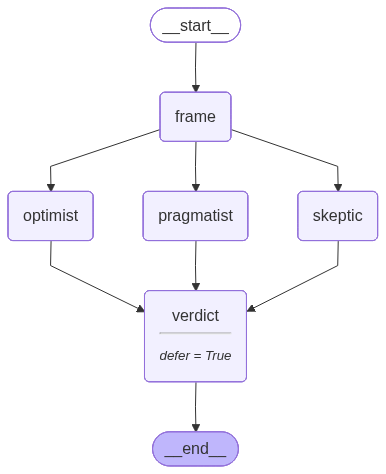
This one is the multi-agent panel from the Quickstart:
frame > fanout(optimist, skeptic, pragmatist) > verdict. The
full notebook tour
walks through rendering, validation, and every node type in one place, and
python demo/app.py opens a local
Gradio playground — paste a
>-DSL snippet, see the diagram and validator output, no API key needed.
How does > become a graph? a > b records a link; AgenticGraph(...) walks
the links once, emits the real LangGraph edges, validates, and compiles — see
Under the hood.
Where to go next
- Quickstart — install, a hello agent, a parallel panel, and the validator catching a real bug.
- Node types — the four node types, a runnable snippet each.
- The validator — every dataflow bug class, with verbatim errors.
- State & observability — state channels, free token accounting, the trace log.
- Examples — 21 runnable files: primitives one per file, plus end-to-end architectures.
- Coming from LangGraph — a direct API mapping.